Downloaded ZIP files are initially liable to be flagged as "blocked". To unblock them, right click on the ZIP file, select Properties, and follow the instructions.
Browsers are becoming increasingly nervous about allowing downloads from insecure sites. https://homepages.plus.net/semitone440/rolls/utils/ is an alternative secure connection to these pages.
The CIS image file format was devised by Richard Stibbons specifically for roll scanning. The CIS Header page provides details of the specification.
| CIS Viewer | Displays CIS files in a scrolling window. |
|---|---|
| CIS Header | Displays settings from the CIS header in a dialog box, allowing them to be edited. |
| CIS Report | Generates a text file of settings from the CIS header and provides an analysis of encoder clock timings, if present. |
| CIS Margins | Removes extraneous clutter from the margins. |
| CIS to BMP BMP to CIS | Converts a CIS file into a series of Windows BMP files and back again, for editing in a paint program. |
| CIS Split | Splits a Bi-Colour CIS file into two, with the Notes in one file and the Lyrics in another. |
| CIS Negative | Creates a negative image of a CIS file, converting a reflective scan into the usual transmissive (backlit) scan format. |
| CIS Twin | Stitches together the two images from a Twin Array CIS file with adjustable offsets to produce a Single Array format file. |
| CIS Reclock | Converts a Type 2 Encoder clocked CIS file into a Type 4 Stepper scanner format file. |
| CIS Aspect | Duplicates or drops scan lines in Type 4 Stepper scanner CIS files to match the vertical resolution to the horizontal resolution. |
| CIS Doubler | Duplicates each scan line, so doubling the displayed height. |
| CIS Cleaner | Removes extraneous single pixel width horizontal and/or vertical lines from the CIS file. |
| CIS Mirror | Reverses each scan line, so creating a mirror image (horizontal inversion). |
| CIS Reverse | Reverses the scan line order, so turning the image upside down (vertical inversion). |
| CIS Swap | Swaps over the two channels in a Twin Array CIS file. |
| CIS Tick View | Creates a diagnostic CIS file in which the encoder clock is visible. |
| CIS to TIFF | Converts CIS files to 8-bit greyscale TIFF files with LZW compression. |
|---|---|
| TIFF to CIS | Converts 8-bit greyscale or 1-bit monochrome TIFF files to bi-colour or single channel CIS files. |
| TIFF Orientation | Displays and/or edits the orientation flag within the TIFF image file directory. |
| TIFF Report | Generates a text file of parameters defined in the Image File Directory. |
| TIFF Slim | Reduces Stanford's massive TIFF files to more modest proportions. |
| TIFF Fix | Mirror Image, Flip, Downscale and LZW Compress TIFF files. |
| TIFF Convert | Improved TIFF to CIS and TIFF to MAP, plus options for compacting TIFF files. |
| TIFF Viewer | Basic viewer for 8-bit greyscale TIFF files. |
The MAP scan image file format was devised by Wayne Stahnke and is used by his punch matrix recovery software. Here's the file specification.
| CIS to MAP | Converts CIS files to 3-bit greyscale MAP format. |
|---|---|
| TIFF to MAP | Converts 8-bit greyscale TIFF files to 3-bit greyscale MAP format. |
| MAP to TIFF | Converts 3-bit greyscale MAP files to 8-bit greyscale TIFF format. |
| MAP Widen | Widens left and right margins of MAP files. |
| MAP Viewer | Basic MAP file viewer. |
| PUNCH to WEB | Converts MIDI perforator punch files to Wayne Stahnke's WEB format. |
|---|---|
| WEB to PUNCH | Converts Wayne Stahnke's WEB files to PUNCH MIDI format. |
| MIDI Division | Displays and/or edits the integer in the SMF header defining the number of MIDI Ticks (Pulses) Per Quarter Note. |
| MIDI Reclock | Rescales event timings in MIDI files, with the option of also rescaling the MIDI Tempo and MIDI Division. |
| MIDI to TEXT TEXT to MIDI | Decompiles MIDI files into ASCII text, allowing the text to be edited and recompiled. |
| MIDI Matrix Finder | Displays a histogram of note timings in MIDI files to reveal the perforator punch row spacing. |
| MIDI Trim | Shortens note lengths whenever they are already held on by the sustain pedal. |
| MIDI Tempo Fix | Reclocks MIDI files with multiple tempo changes to ones with a single fixed tempo while maintaining their original durations. |
RAW is an intermediate file format normally derived from MAP image files by Wayne Stahnke's REDUCE program.
| MIDI to RAW | Converts MIDI files that are a direct representation of the scan image into RAW format. |
|---|---|
| RAW Matrix Finder | Displays a histogram of note timings in RAW files to reveal the perforator punch row spacing. |
| File Date | Allows file dates to be modified. |
|---|---|
| File Mirror | Scrambles and unscrambles files, allowing them to be distributed without being intercepted by overzealous virus checkers. |
The programs are all written in assembly language which produces fast, compact code. No special run-time libraries are needed, just plain old Windows XP or anything since then. No installation or uninstallation is required. They are all quite benign, write nothing to the registry, and can be run from any location, even from within the downloaded ZIP file.
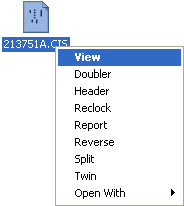
Initially it's easiest just to run the program then drop the file into the program window. For regular use, consider associating the program with the file type using a right-click menu option.
All output is directed to the same folder as the source file with a suitably modified filename.