 MIDI ReclockMIDI Reclock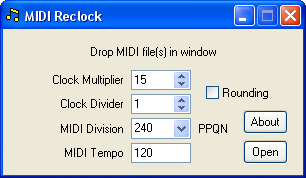
This utility rescales event timings in SMF MIDI files, with the option of also rescaling the MIDI Tempo and MIDI Division. Changing any one of these parameters will alter the overall duration, however the original duration may be preserved by making complementary changes to more than one parameter. The source file is left intact and its name is modified for the target filename by incorporating the scaling ratio.
Current version 1.01, 5 September 2017. MidiReclock.zip
The clock is multiplied by the Clock Multiplier then divided by the Clock Divider. With Rounding disabled, the conversion will only take place if the MIDI clock can be scaled exactly, without any loss of precision. With Rounding enabled, where necessary the clock will be rounded up or down to the nearest integer at the division stage. Calculations are performed on the total elapsed time, to avoid cumulative errors.
The MIDI Division is an integer stored in the SMF file header which defines the number of MIDI clock ticks representing a quarter note (analogous to a beat in x/4 time signatures). MIDI files often have no need to conform to this strict regime, nevertheless the MIDI Division has a direct bearing on the playback speed. A new MIDI Division may be picked from the drop-down list of safe values that will not provoke Cakewalk into a surreptitious reclocking operation of its own. Alternative values may also be typed in. If left blank, the original MIDI Division is retained.
A new MIDI Tempo may be specified to replace the original tempo. Any subsequent tempo changes in the file will then be scaled proportionately. If left blank, the tempo remains unaltered.
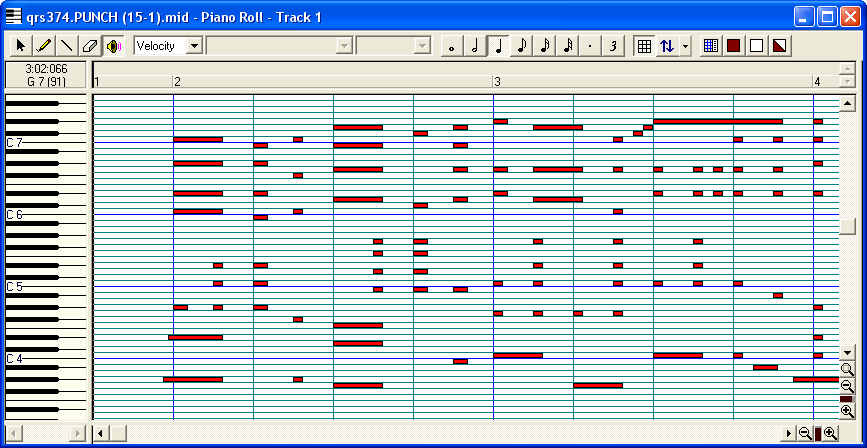
A large proportion of piano rolls were arranged with a fixed number of punch rows per beat. This makes it possible, with an appropriate choice of scale, to derive from the reconstructed punch master a MIDI file in which the music is synchronised to the beats and bar lines in a MIDI editor like Cakewalk. Any timing errors that may have crept in along the way immediately become apparent. The file can be edited in this form in Cakewalk then, if necessary, converted back to its original scale using a reciprocal scaling factor. Setting Cakewalk's Snap To Grid function to the number of ticks per punch row allows editing to be performed in increments of punch rows.
The scaling ratio is chosen to equate the number of clock Ticks Per Quarter Note (Beat) to the MIDI Division setting in the MIDI header. Take, for example, this QRS roll which has 16 punch Rows Per Beat. The table below shows 7 possible combinations of Clock Multiplier and MIDI Division for 16 Rows Per Beat. Pick any one. In this case 15 Ticks Per Row with a MIDI Division of 240 PPQN was chosen. The Clock Multiplier for the conversion is set to 15. The Clock Divider is set to the number of Ticks Per Row adopted by the punch master, in this case 1.
Aligning the music beats with MIDI's quarter notes also has the effect of equating the music tempo to the MIDI Tempo. The correct tempo setting can be established from the formula:
MIDI Tempo = Roll Tempo x Rows Per Foot / (Rows Per Beat x 10)
The example has a marked Roll Tempo of 80, with 240 Rows Per Foot and 16 Rows Per Beat. The MIDI Tempo should therefore be set to 80 x 240 / 160 = 120 Beats Per Minute.
The punch master is available here to recreate the example.
| MIDI Division | |||||||||||||
|---|---|---|---|---|---|---|---|---|---|---|---|---|---|
| 48 | 72 | 96 | 120 | 144 | 168 | 192 | 216 | 240 | 360 | 384 | 480 | ||
| Punch Rows Per Beat | 6 | 8 | 12 | 16 | 20 | 24 | 28 | 32 | 36 | 40 | 60 | 64 | 80 |
| 8 | 6 | 9 | 12 | 15 | 18 | 21 | 24 | 27 | 30 | 45 | 48 | 60 | |
| 9 | 8 | 16 | 24 | 40 | |||||||||
| 10 | 12 | 24 | 48 | ||||||||||
| 12 | 4 | 6 | 8 | 10 | 12 | 14 | 16 | 18 | 20 | 30 | 32 | 40 | |
| 14 | 12 | ||||||||||||
| 15 | 8 | 16 | 24 | 32 | |||||||||
| 16 | 3 | 6 | 9 | 12 | 15 | 24 | 30 | ||||||
| 18 | 4 | 8 | 12 | 20 | |||||||||
| 20 | 6 | 12 | 18 | 24 | |||||||||
| 21 | 8 | ||||||||||||
| 24 | 2 | 3 | 4 | 5 | 6 | 7 | 8 | 9 | 10 | 15 | 16 | 20 | |
| 27 | 8 | ||||||||||||
| 28 | 6 | ||||||||||||
| 30 | 4 | 8 | 12 | 16 | |||||||||
| 32 | 3 | 6 | 12 | 15 | |||||||||
| 36 | 2 | 4 | 6 | 10 | |||||||||