 CIS Tick ViewCIS Tick View
CIS Tick View reveals the embedded clock signal in encoder clocked scans.
Encoder clocked scanners use an encoder wheel that runs along the roll to measure its progress, avoiding the need for a synchronous capstan drive. The encoder clock is embedded in the CIS data and is normally not visible. CIS Tick View reveals the encoder clock by converting a Single Array CIS file into Bi-Colour format, using the second channel to overlay the clock transitions as a series of horizontal lines.
Current version 1.00, 12 Jan 2011. CIS-TICKVIEW.ZIP
Drop the CIS file into the window (or use the Open file button) to produce a Bi-Colour CIS file with a modified (tick view).cis name. Examine the new file with CIS Viewer.
The default Half Clock Rate option uses every other clock edge, resulting in a less cluttered display.
The operation is unfortunately only applicable to Single Array scans as Twin Array scans already utilise the second data channel.
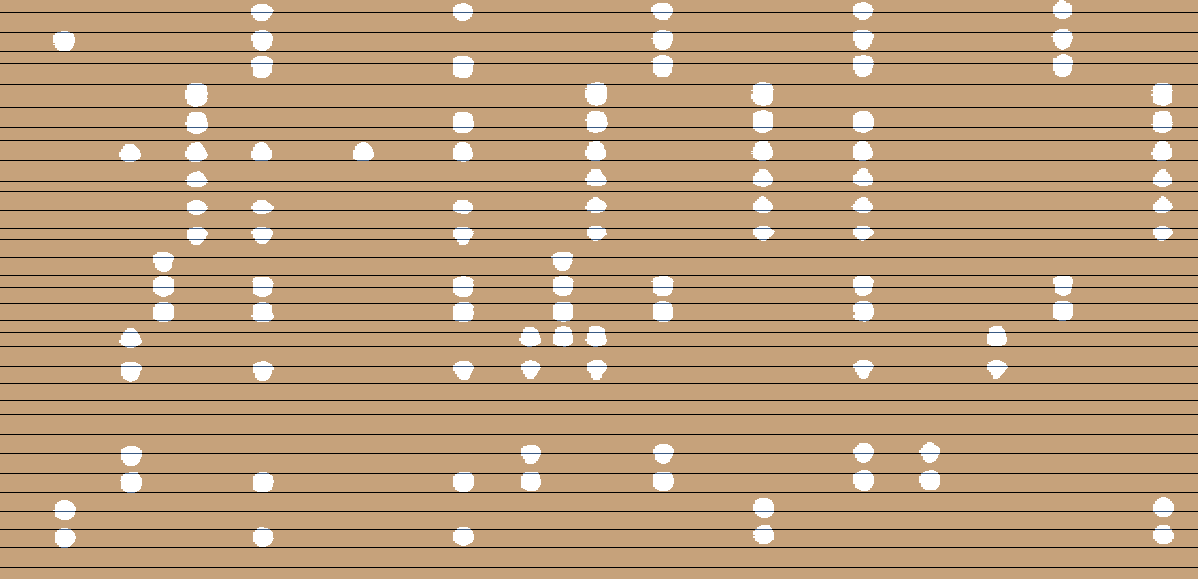
The encoder clock should appear as a series of regularly spaced black lines, which is clearly not the case here. The only variation should be a gradual reduction in the line spacing throughout the length of the roll, corresponding with a progressive increase in the encoder clock frequency as the roll accelerates due to build-up on the driven take-up spool.
The encoder clock should accurately represent the movement of the roll as it passes through the scanning area. Ideally the wheel should be located as close to the scanning area as possible, however it is common practice for the wheel to run on the supply spool. For this to work satisfactorily:
In the above example, distortion of the punch images can be seen to coincide with disturbances in the encoder clock pattern. This suggests that the problem is probably due to insufficient back tension causing the roll to periodically throw a loop.