 TIFF OrientationTIFF Orientation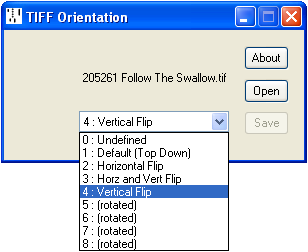
Displays and allows editing of the Orientation flag in the TIFF Image File Directory (TIFF Tag 274).
The two settings relevant to our needs are:
| 1: Default | The first pixel in the file is displayed in the top left corner. This is only applicable in the minority of cases, such as Red Welte rolls, where the take-up spool is above the feed spool. | |
| 4: Vertical Flip | The first pixel in the file is displayed in the bottom left corner. This is the usual configuration, where the take-up spool is below the feed spool, and the roll scrolls downwards. |
The TIFF specification allow this tag to be optional: in its absence a value of 1 is assumed, however the tag must be present in order for this utility to modify it.
Current version 1.02, 7 September 2018. TIFFORIENT.ZIP
Be aware that many applications ignore this flag, which just means that the image is liable to be displayed upside down. Photoshop, however, rotates the image accordingly, but if the file is then saved the image remains rotated with the orientation flag set back to 1 : Default (Top Down). While this might be helpful in other situations, for our purposes it can have the undesired effect of reversing the note order. If the file needs editing in Photoshop, the workaround is first to set the tag to Normal, then reinstate it afterwards.