 TIFF SlimTIFF Slim
While this may find other uses, TIFF Slim is primarily aimed at converting Stanford's piano roll scans into greyscale images with the option of downscaling and implementing LZW lossless compression to further reduce their size.
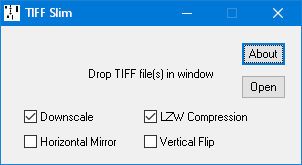
The source files may be full colour RGB or greyscale (Green channel only), conventional 32-bit or 64-bit Big TIFF format, with or without LZW compression, strips or horizontal differencing. RGB images are converted to Green channel only greyscale files, resulting in an immediate threefold reduction in file size. The target files are conventional 32-bit TIFF format.
Here, for example, a 192 foot long, full colour 300 DPI uncompressed TIFF file, weighing in at a massive 8.8 gigabytes, was converted to 150 DPI greyscale with LZW compression, resulting in a twenty-twofold reduction in file size.

Drop the TIFF file(s) into the program window (or use the Open button to select the file in the conventional way).
Halves the resolution (typically from 300 to 150 DPI), resulting in a further fourfold reduction in file size. Sub-pixel resolution allows detail to be resolved with much greater precision than the native resolution might suggest.
Lossless LZW compression further reduces the file size to typically around 60% of its uncompressed size (the random nature of the paper grain limits its effectiveness but it's still worthwhile).
Mirror images scan lines where left and right have become swapped. This is also performed if the horizontal mirror orientation flag is set in the source file and the flag will then be cleared in the target file.
This just sets the orientation flag in the TIFF header to indicate that the image should be displayed from the bottom up, as is usually the case with rolls (though not Red Welte). If this option is left unchecked, the vertical orientation in the target file will be inherited from the source file.
The scan line order remains unchanged but note that while editors such as Photoshop and IrfanView respect this flag to the extent that they display the roll with the correct orientation, nevertheless, if the edited file is then saved without first flipping the image back again, the scan line order is liable to be reversed, resulting in the music being stored backwards.
Current version 1.10 (5 March 2021): TIFFSLIM.ZIP