 PUNCH to WEBPUNCH to WEB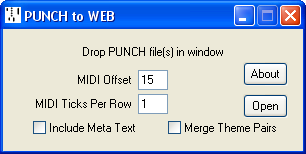
This utility converts PUNCH MIDI (type 0 or 1) files to Wayne Stahnke's WEB format, for use with his perforator control software.
Current version 1.04, 25 January 2009. PunchToWeb.zip
The MIDI Offset represents the difference between MIDI note numbers and their corresponding working port numbers in the WEB file, which generally start up from zero. A typical 11.25 inch, 9 tracks per inch roll can accommodate up to 100 tracks which normally start up from MIDI note 15 so that the playing notes are assigned to their correct register. The MIDI Offset is however adjustable, and can be either positive or negative. The WEB format can accommodate up to 240 working ports. Where this exceeds MIDI's 128 note limit, notes may overflow from channel 1 into channel 2.
WEB files generally assume one clock tick per punch row, and PUNCH MIDI files can do likewise. Where the PUNCH MIDI file uses a multiple number of clock pulses per row, enter this multiple into the MIDI Ticks Per Row, and the clock will be scaled down accordingly. To ensure the integrity of the conversion, any clock intervals in the PUNCH file that are not exact multiples of the Ticks Per Row will generate an error message.
MIDI Meta Marker, Cue, Lyric and Copyright events all have WEB equivalents and are converted across. MIDI Meta Text events also have a WEB equivalent, except that they are generally used to record annotation in the MIDI file whereas a WEB file has an associated ANNotation file for the purpose. Meta Text (Type 1) text events are therefore excluded from the WEB file by default, with the option to include them, if required.
This option merges duplicate theme punches in adjacent tracks into a single track, as required by programs like Richard Brandle's "Wind". Only use this option where theme punches are present, otherwise it is liable to merge adjacent expression tracks.
MIDI lyric events use trailing spaces to indicate word breaks, otherwise the break is assumed to be between syllables. However WEB lyric events, like the rolls themselves, assume a word break unless the last character is a hyphen. PUNCH to WEB performs the necessary translation.
These are optional events. Typically End Of Section markers may be distributed throughout the performance, with a single End Of Performance marker placed just before the reroll. They are represented in the MIDI file as zero length events, occupying the top two notes in Channel 2:
| Marker | Zero Length Event |
|---|---|
| End Of Section | MIDI Channel 2, Note 126 |
| End Of Performance | MIDI Channel 2, Note 127 |
Note that with a MIDI offset of 15, the End Of Section marker occupies the position reserved for the top working port, reducing the number of available working ports to 239.