 MIDI Matrix FinderMIDI Matrix Finder
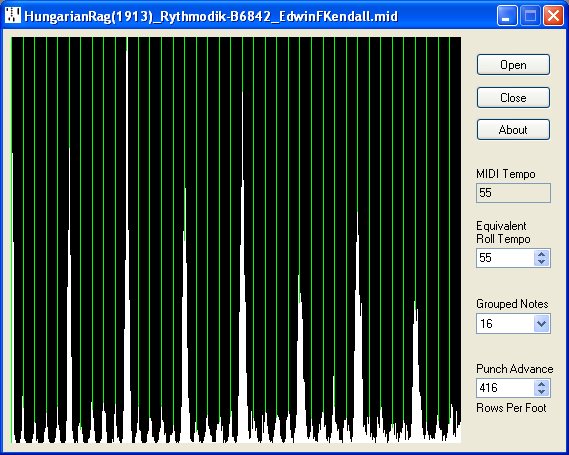
MIDIMATRIX displays a histogram of the separation between events in a MIDI file, allowing the perforator step size to be determined.
Current version 1.01 (14 March 2019): MIDIMATRIX.ZIP
The prime requirement is a MIDI file where each tick represents a uniform distance throughout the length of the roll.
Capstan driven scanners should preserve this relationship unless tempo acceleration has been applied using a fixed MIDI tempo. Where there is no tempo acceleration, or it is applied as a series of MIDI tempo changes, then all should be well.
Take-up spool driven scanners do not maintain this fixed relationship unless steps are taken to achieve this, such as by triggering scan lines with an encoder wheel.
Drop the MIDI file into the program window (or use the Open button to select the file in the conventional way).
Simply displays the MIDI Tempo.
If the MIDI Tempo does not equate to the Roll Tempo enter the Equivalent Roll Tempo (including any departure from the Marked Tempo). MIDI files produced by Warren Trachtman's software are likely to have the MIDI Tempo already set to the Roll Tempo.
Grouping notes together increases the number of measurements but makes them more susceptible to skew errors where the punch rows are not exactly horizontal. The default setting of 16 is generally a good compromise but feel free to experiment.
Concentrating first on the left-hand side of the display, adjust the Punch Advance to align the grid with the peaks in the histogram as closely as possible across the width of the display. The easiest way is first to click the edit box and then use either the cursor up/down keys or the mouse wheel to spin through the settings.