 CIS to TIFFCIS to TIFF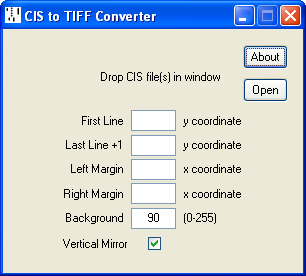
CIS2TIFF converts CIS files into 8-bit greyscale TIFF image files with LZW compression.
| First Line | Optionally allows the start and end of the CIS file to be excluded. CIS Viewer's left mouse button click provides appropriate Y coordinates. |
| Last Line +1 | |
| Left Margin | Optionally sets all pixels in the margins to white. CIS Viewer's left mouse button click provides appropriate X coordinates. |
| Right Margin | |
| Background | Sets the background level to mid-grey (90) by default, with holes appearing white and
words (if present) black. Setting the Background to 0 (black) renders the words invisible; likewise, setting the Background to 255 (white) renders the holes invisible. |
| Vertical Mirror | Sets a flag in the TIFF Image File Directory indicating that the file should be viewed
from the bottom up, as is the case with most roll types. Unfortunately not all TIFF viewers/editors respect this flag and, worse, if the flag is set Photoshop will clear it and reverse the scan line order when saving the file. The workaround is to use the TIFF Orientation utility to clear the flag before editing, then to reinstate it afterwards. |
During conversion the hourglass cursor is displayed while the mouse is within the window.
Twin array CIS files are not supported. Encoder clocked CIS files must be run through CIS RECLOCK prior to conversion.
Current version 1.01, 8 Jan 2023. CIS2TIFF.ZIP
1.01 fixes bug when restricted line range specified.