 CIS HeaderCIS Header
Displays settings from the CIS header, allowing them to be edited and saved back to the CIS file.
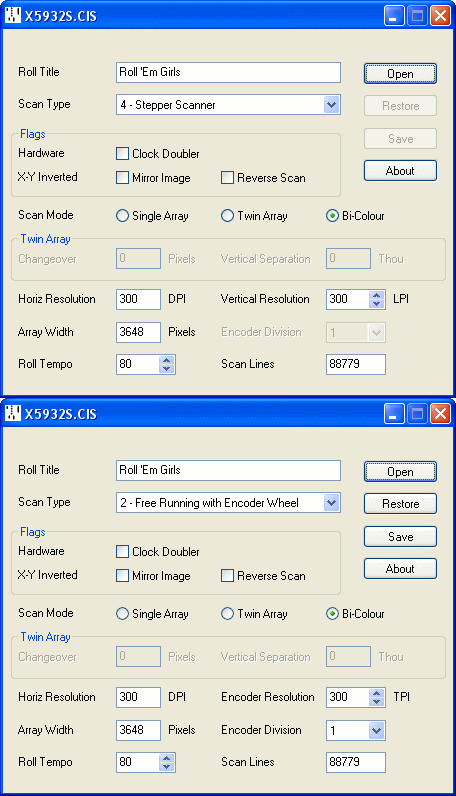
Current version 1.03, 17 June 2010. CISHEADER.ZIP
| Roll Title | 32 characters allocated for text, most usefully the Roll Title. |
| Scan Type | 1 - Free Running; 2 - Free Running with Encoder Wheel; 3 - Free Running with Shaft Encoder; 4 - Stepper Scanner Note: Richard defined all these in his CIS specification starting from zero but unfortunately implemented them in software starting from one. A purist might argue that the specification has to be right, but the pragmatic solution is to rewrite the specification. |
| Clock Doubler | A flag set to indicate that the scan was produced using clock doubling circuitry, namely the Mk3a board. Why would you need to know this, though? |
| Mirror Image | A flag set to indicate that treble and bass are reversed in the scan, as is liable to occur when scanning Welte T-100 rolls. |
| Reverse Scan | A flag set to indicate that the scan is stored end first, normally as a result of having been scanned backwards. The attractions of reverse scanning are (1) the opportunity to inspect the roll before scanning, (2) the reduced risk of ripping the roll from its core, and (3) it ends up already rewound. The snag is that the roll tends to wander so the idea has never been adopted. |
| Scan Mode | Single Array, Twin Array or Bi-Colour. In theory it's possible to have a Twin Array, Bi-Colour scanner, but thankfully nobody has yet attempted this. |
| Changeover | Applicable only to Twin Arrays, otherwise it should be set to zero (earlier software relied on this). Twin arrays are mounted opposite ways round so that each scans from the edge of the roll towards the centre. The Changeover historically represents the pixel count to the mid point where the two arrays cross over and a seamless transition from one array to the other may take place. The resulting scanned width is therefore twice the Changeover value. A recent variant of this defines the Changeover as the Overlap between the two arrays, so that the resulting scanned width is the combined width of the two arrays minus the Overlap. To distinguish one from the other: in the first case the Changeover value should always be more than half the array width (the notion of two arrays producing less width than one is clearly absurd). In the second case the Overlap is likely to be less than half the array width, but whether this can always be relied upon is less certain. |
| Vertical Separation | Applicable only to Twin Arrays: the Vertical Separation between the two arrays in Thousandths of an inch. Note that this does not specify which array is ahead of the other and it seems both configurations are currently in existence. The original specification missed a trick here as it would be possible to specify a negative separation. However it would doubtless wreak havoc if introduced now so we're probably stuck with this ambiguity. |
| Horizontal Resolution | The horizontal scan resolution in Dots Per Inch. Usually 300 DPI but there are also some 200 DPI scans in circulation. |
| Array Width | The array width in pixels. The popular Dyna-Image A3 array is 3648 pixels wide (consisting internally of 38 sensors, each 96 pixels wide). An incorrect setting here, that does not match the scan data, can render the file unreadable. |
| Roll Tempo | An integer representing the Roll Tempo. If the roll suggests a range of tempos, pick an appropriate Play Tempo, using this editor to enter it retrospectively if need be. |
| Vertical / Encoder Resolution | For Type 4 Stepper scanners, this represents the Vertical Resolution in scan Lines Per Inch. For Type 2 (or 3) Encoder scans, this represents the Encoder Resolution in Ticks Per Inch as it emerges from the encoder wheel. |
| Encoder Division | Applicable only to Type 2 (or 3) scans, otherwise it should be set to unity. The Encoder Division ratio should match the jumper settings on the Mk 3/3a board. The encoder wheel is fed through a tapped binary divider chain whose output state is flagged in the file as a single bit at the end of each scan line. It is essential that the division ratio is sufficient to ensure that there can never be more than one state change per scan line, otherwise clock transitions will be lost. |
| Scan Lines | The total number of scan lines in the file. An incorrect setting here, that does not match the scan data, can render the file unreadable. |
Richard Stibbons' 2003 document Contact Image Sensor Roll Scanner File Formats