TIFF
FixTIFF
Fix
TIFF
FixTIFF
FixTIFF Fix is an enhanced version of TIFF Slim which was originally written to convert Stanford's massive scans into a more manageable format. It has since proved useful for other purposes such as horizontally mirroring scans.
|
|
The source files may be full colour RGB or greyscale, conventional 32-bit or 64-bit Big TIFF format, with or without LZW compression, strips or horizontal differencing. RGB images are converted to Green channel only greyscale files, resulting in an immediate threefold reduction in file size. The output files are 32-bit, greyscale TIFF format.
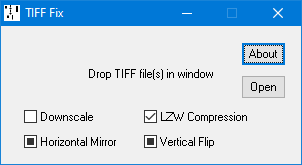
Drop the TIFF file(s) into the program window (or use the Open button to select the file in the conventional way).
The output will be written to a new file in the same folder with a modified filename, comprising of a "g" if the green channel has been extracted from a colour file, the horizontal resolution, and "uncompressed" and "mirrored" where appropriate.
Halves the resolution (typically from 300 to 150 DPI), resulting in a fourfold reduction in file size. Sub-pixel resolution allows detail to be resolved with much greater precision than the native resolution might suggest.
Lossless LZW compression further reduces the file size to typically around 60% of its uncompressed size. The random nature of the paper grain limits its effectiveness but if the paper is a uniform shade, the compression can be far more dramatic.
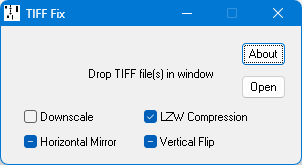
Both Horizontal Mirror and Vertical Flip check boxes cycle through three states:
 Unchecked,
 Checked and
 Indeterminate
which are readily distinguishable in previous versions of Windows but unfortunately less so in
Windows 11, where the
Indeterminate
which are readily distinguishable in previous versions of Windows but unfortunately less so in
Windows 11, where the  Checked and
 Indeterminate states are very similar.
Mirror images scan lines where left and right need to be swapped.
Scan lines will not be mirror imaged.
Scan lines will be mirror imaged.
Scan lines will be mirror imaged if the horizontal mirror flag is set in the source file.
In each case the horizontal mirror flag will be cleared in the output file.
Vertical Flip does not reverse the scan line order as that would store the music backwards. Instead, it just sets the orientation flag in the TIFF header to indicate whether the image should be displayed from the bottom up or from the top down.
The vertical flip flag will be cleared in the output file.
The vertical flip flag will be set in the output file. This is the normal setting for most piano rolls.
The vertical flip flag will be inherited from the source file.
The scan line order remains unchanged but note that while editors such as Photoshop and IrfanView respect this flag to the extent that they display the roll with the correct orientation, nevertheless, if the flag was set and the edited file is then saved without first flipping the image back again, the scan line order is liable to be reversed.
Current version 2.01 (6 March 2026): TIFFFIX.ZIP